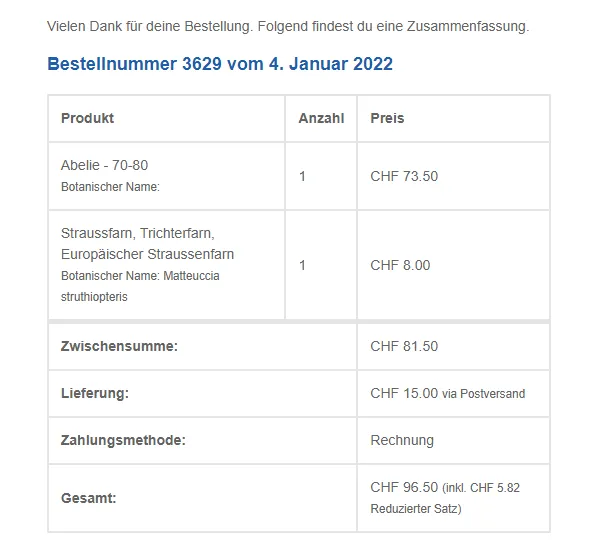
Hallo zusammen
Ich habe einen Onlineshop mit WooCommerce auf die Beine gestellt; mit Pflanzen.
Der Artikelname ist jeweils der Pflanzenname auf Deutsch, als Eigenschaft ist noch der jeweilig dazugehörige latainische Name mit dem slug „botanischer-name“.
Wie bringe ich nun den botanischen Namen ins Bestätigunsmail an den Kunden und an mich? Mit folgender Programmierung zeigt es mir bei einfachen Artikeln der botanische Name an, NICHT aber bei Variantenartikel.
$label_name = "Botanischer Name";
$bot_nam = $product->get_attribute('botanischer-name');
echo '<br/><small>' . $label_name . ': ' . nl2br( $bot_nam ) . '</small>';
Hat jemand eine Idee, warum dies so ist und wie es mir auch bei Variantenartikel der botanische Name anzeigt?
Es handelt sich um die URL http://balmerga.myhostpoint.ch/onlinewelt/.
Benutzername ist renew, das Zauberowort lautet DasWort
Hier mein Wordpress-Bericht
### wp-core ###
version: 5.8.2
site_language: de_CH
user_language: de_CH
timezone: Europe/Zurich
permalink: /%postname%/
https_status: false
multisite: false
user_registration: 0
blog_public: 1
default_comment_status: open
environment_type: production
user_count: 5
dotorg_communication: true
### wp-paths-sizes ###
wordpress_path: /home/balmerga/www/balmerga.myhostpoint.ch
wordpress_size: 48.55 MB (50907329 bytes)
uploads_path: /home/balmerga/www/balmerga.myhostpoint.ch/wp-content/uploads
uploads_size: 259.55 MB (272157038 bytes)
themes_path: /home/balmerga/www/balmerga.myhostpoint.ch/wp-content/themes
themes_size: 22.36 MB (23448122 bytes)
plugins_path: /home/balmerga/www/balmerga.myhostpoint.ch/wp-content/plugins
plugins_size: 85.90 MB (90077914 bytes)
database_size: 23.45 MB (24592384 bytes)
total_size: 439.82 MB (461182787 bytes)
### wp-active-theme ###
name: Balmer Site (balmer-site)
version: 1.0
author: Christoph Hautle
author_website: (undefined)
parent_theme: Startup Shop Pro (startup-shop-pro)
theme_features: core-block-patterns, widgets-block-editor, post-thumbnails, automatic-feed-links, title-tag, menus, html5, custom-background, customize-selective-refresh-widgets, custom-logo, post-formats, responsive-embeds, custom-header, woocommerce, wc-product-gallery-zoom, wc-product-gallery-lightbox, wc-product-gallery-slider, widgets, editor-style
theme_path: /home/balmerga/www/balmerga.myhostpoint.ch/wp-content/themes/balmer-site
auto_update: Deaktiviert
### wp-parent-theme ###
name: Startup Shop Pro (startup-shop-pro)
version: 1.0.7
author: aThemeArt
author_website: https://www.athemeart.com/
theme_path: /home/balmerga/www/balmerga.myhostpoint.ch/wp-content/themes/startup-shop-pro
auto_update: Deaktiviert
### wp-themes-inactive (3) ###
Balmer Twenty Twenty: version: 1.0 (2021-08-08), author: Christoph Hautle, Automatische Aktualisierungen deaktiviert
Startup Shop: version: 1.0.2, author: aThemeArt (latest version: 1.0.4), Automatische Aktualisierungen deaktiviert
Twenty Twenty: version: 1.8, author: WordPress-Team, Automatische Aktualisierungen deaktiviert
### wp-plugins-active (11) ###
Blog Post Layouts for Gutenberg & Elementor: version: 1.0.2, author: Codevibrant, Automatische Aktualisierungen deaktiviert
Breadcrumb NavXT: version: 6.6.0, author: John Havlik, Automatische Aktualisierungen deaktiviert
Codestar Framework: version: 2.1.8, author: Codestar, Automatische Aktualisierungen deaktiviert
Contact Form 7: version: 5.5.3, author: Takayuki Miyoshi, Automatische Aktualisierungen deaktiviert
Elementor: version: 3.4.8, author: Elementor.com (latest version: 3.5.0), Automatische Aktualisierungen deaktiviert
FileBird Lite: version: 4.9.3, author: Ninja Team (latest version: 4.9.7), Automatische Aktualisierungen deaktiviert
Kadence WooCommerce Email Designer: version: 1.4.9, author: Kadence WP, Automatische Aktualisierungen deaktiviert
One Click Demo Import: version: 3.0.2, author: OCDI, Automatische Aktualisierungen deaktiviert
WooCommerce: version: 5.9.0, author: Automattic, Automatische Aktualisierungen deaktiviert
WooCommerce PostFinance Checkout: version: 1.7.2, author: wallee AG, Automatische Aktualisierungen deaktiviert
Yoast SEO: version: 17.5, author: Team Yoast (latest version: 17.8), Automatische Aktualisierungen deaktiviert
### wp-plugins-inactive (8) ###
Advanced Product Search For WooCommerce PRO: version: 1.2.0, author: aThemeArt, Automatische Aktualisierungen deaktiviert
Akismet Anti-Spam: version: 4.2.1, author: Automattic, Automatische Aktualisierungen deaktiviert
Hello Dolly: version: 1.7.2, author: Matt Mullenweg, Automatische Aktualisierungen deaktiviert
Mega WooCommerce Addons for Elementor Pro: version: 1.0.2, author: Towhid, Automatische Aktualisierungen deaktiviert
Options for Twenty Twenty: version: 1.5.7, author: Webd Ltd, Automatische Aktualisierungen deaktiviert
Quick View WooCommerce: version: 1.7, author: XootiX, Automatische Aktualisierungen deaktiviert
Smart Variation Swatches for WooCommerce PRO: version: 1.7.2, author: aThemeArt, Automatische Aktualisierungen deaktiviert
WooCommerce Modal Fly Cart + Ajax add to cart PRO: version: 1.1.9, author: aThemeArt, Automatische Aktualisierungen deaktiviert
### wp-media ###
image_editor: WP_Image_Editor_Imagick
imagick_module_version: 1692
imagemagick_version: ImageMagick 6.9.12-12 Q16 amd64 2021-05-09 https://imagemagick.org
imagick_version: 3.5.0
file_uploads: File uploads is turned off
post_max_size: 64M
upload_max_filesize: 64M
max_effective_size: 64 MB
max_file_uploads: 20
imagick_limits:
imagick::RESOURCETYPE_AREA: 984 GB
imagick::RESOURCETYPE_DISK: 9.2233720368548E+18
imagick::RESOURCETYPE_FILE: 1536
imagick::RESOURCETYPE_MAP: 984 GB
imagick::RESOURCETYPE_MEMORY: 492 GB
imagick::RESOURCETYPE_THREAD: 1
imagemagick_file_formats: 3FR, 3G2, 3GP, AAI, AI, APNG, ART, ARW, AVI, AVIF, AVS, BGR, BGRA, BGRO, BIE, BMP, BMP2, BMP3, BRF, CAL, CALS, CANVAS, CAPTION, CIN, CIP, CLIP, CMYK, CMYKA, CR2, CR3, CRW, CUR, CUT, DATA, DCM, DCR, DCX, DDS, DFONT, DNG, DOT, DPX, DXT1, DXT5, EPDF, EPI, EPS, EPS2, EPS3, EPSF, EPSI, EPT, EPT2, EPT3, ERF, FAX, FILE, FITS, FRACTAL, FTP, FTS, G3, G4, GIF, GIF87, GRADIENT, GRAY, GRAYA, GROUP4, GV, H, HALD, HDR, HEIC, HISTOGRAM, HRZ, HTM, HTML, HTTP, HTTPS, ICB, ICO, ICON, IIQ, INFO, INLINE, IPL, ISOBRL, ISOBRL6, J2C, J2K, JBG, JBIG, JNG, JNX, JP2, JPC, JPE, JPEG, JPG, JPM, JPS, JPT, JSON, K25, KDC, LABEL, M2V, M4V, MAC, MAGICK, MAP, MASK, MAT, MATTE, MEF, MIFF, MKV, MNG, MONO, MOV, MP4, MPC, MPG, MRW, MSL, MSVG, MTV, MVG, NEF, NRW, NULL, ORF, OTB, OTF, PAL, PALM, PAM, PANGO, PATTERN, PBM, PCD, PCDS, PCL, PCT, PCX, PDB, PDF, PDFA, PEF, PES, PFA, PFB, PFM, PGM, PGX, PICON, PICT, PIX, PJPEG, PLASMA, PNG, PNG00, PNG24, PNG32, PNG48, PNG64, PNG8, PNM, POCKETMOD, PPM, PREVIEW, PS, PS2, PS3, PSB, PSD, PTIF, PWP, RADIAL-GRADIENT, RAF, RAS, RAW, RGB, RGBA, RGBO, RGF, RLA, RLE, RMF, RW2, SCR, SCT, SFW, SGI, SHTML, SIX, SIXEL, SPARSE-COLOR, SR2, SRF, STEGANO, SUN, SVG, SVGZ, TEXT, TGA, THUMBNAIL, TIFF, TIFF64, TILE, TIM, TTC, TTF, TXT, UBRL, UBRL6, UIL, UYVY, VDA, VICAR, VID, VIDEO, VIFF, VIPS, VST, WBMP, WEBM, WEBP, WMF, WMV, WMZ, WPG, X3F, XBM, XC, XCF, XPM, XPS, XV, YCbCr, YCbCrA, YUV
gd_version: 2.3.1
gd_formats: GIF, JPEG, PNG, WebP, BMP
ghostscript_version: 9.52
### wp-server ###
server_architecture: FreeBSD 12.2-RELEASE-p10 amd64
httpd_software: Apache
php_version: 7.4.26 64bit
php_sapi: cgi-fcgi
max_input_variables: 10000
time_limit: 30
memory_limit: 256M
max_input_time: 60
upload_max_filesize: 64M
php_post_max_size: 64M
curl_version: 7.80.0 OpenSSL/1.1.1l
suhosin: false
imagick_availability: true
pretty_permalinks: true
htaccess_extra_rules: true
### wp-database ###
extension: mysqli
server_version: 10.3.32-MariaDB-log
client_version: mysqlnd 7.4.26
### wp-constants ###
WP_HOME: undefined
WP_SITEURL: undefined
WP_CONTENT_DIR: /home/balmerga/www/balmerga.myhostpoint.ch/wp-content
WP_PLUGIN_DIR: /home/balmerga/www/balmerga.myhostpoint.ch/wp-content/plugins
WP_MEMORY_LIMIT: 40M
WP_MAX_MEMORY_LIMIT: 256M
WP_DEBUG: false
WP_DEBUG_DISPLAY: true
WP_DEBUG_LOG: false
SCRIPT_DEBUG: false
WP_CACHE: false
CONCATENATE_SCRIPTS: undefined
COMPRESS_SCRIPTS: undefined
COMPRESS_CSS: undefined
WP_LOCAL_DEV: undefined
DB_CHARSET: utf8mb4
DB_COLLATE: undefined
### wp-filesystem ###
wordpress: writable
wp-content: writable
uploads: writable
plugins: writable
themes: writable


 exit;
exit;