

Hallo Leute, ich suche mich schon seit Tagen durch das Internet durch. Und zwar suche ich eine Möglichkeit per Plugin ganz unkompliziert meine excel Tabelle die in one drive ist oder klar es geht auch Googledrive wenn es muss. Die Tabelle wird live aktualisiert also so gesehen muss sie synchronisiert werden. Am besten ca 1min oder eher weniger. Dazu muss sich in ein paar bestimmten Zeilen die Schriftfarbe ändern positiv grün negativ rot, wie in excel es halt auch passiert. Vielleicht habt ihr da eine Lösung. Dazu sollte sie sich filtern lassen und auf mobilen Geräten vom Benutzer angepasst werden.

Excel live
-
-
- Gerade eben
- Anzeige
Hallo!
Wenn du gerade an deiner Website arbeitest oder dein aktuelles Hosting überdenkst: Wir betreiben mit NetzLiving eine Hosting-Plattform, die speziell auf Performance, Sicherheit und einfache Verwaltung ausgelegt ist.
- ✔️ Schnelle Ladezeiten (optimiert für WordPress & Co.)
- ✔️ Deutsche Server & DSGVO-konform
- ✔️ Persönlicher Support (kein 0815-Ticket-System)
-
Schau Dir mal TablePress an, mit u.a. der Automatic Periodic Table Import Extension.
-
Hallo wichtig noch dazu ich will es vorher testen, viele sind ja kostenpflichtig.
-
wpdatatables kann das!
https://wpdatatables.com/embed-excel-in-html/
Geht mit OneDrive und Google Spreadsheets
-

wpdatatables kann das!
https://wpdatatables.com/embed-excel-in-html/
Geht mit OneDrive und Google Spreadsheets
auch mit der Funktion das sich die Schriftfarbe ändert ?
-
wpdatatables kann das!
https://wpdatatables.com/embed-excel-in-html/
Geht mit OneDrive und Google Spreadsheets
Kannst du mir helfen? Beim hochladen aus dem Google Drive der Datei kommt immer wieder Bad request. Schlüssel der API ist alles vorhanden -
Servus! Wegen Farbe: Den genauen Umfang musst du dir selbst anschauen.
Die API Probleme lassen sich sicher lösen, bissl tüfteln und dann wirds scho
-
Sevus Souri - und Tim2311
vielen Dank für den tollen Thread - ich hatte bis dato lediglich WPTables eingesetzt - und das hier erwähnte noch gar nicht gekannt.
Das sieht aber auch sehr sehr gut aus - und kann echt viel.
Publish Google Sheets
https://wpdatatables.com/embed-excel-in-html/ZitatAlles anzeigenEnsuring everyone is allowed to see your Google Sheets will require you to publish the file. Go to your Google Drive, open the desired document, click on “File” and then “Publish to the Web.”
It is necessary to select the Embed tab and to choose between publishing the whole document or only selected pages.
When you edit your original spreadsheet, the changes will be automatically republished on the website. You can easily change that by unchecking the “Automatically republish when changes are made” (located in the “Publish Content” and “Settings” tabs).
And you can get more info about the process through our documentation page for importing data from Excel, CSV or Google Spreadsheets.
The best way to embed Excel in HTML and WordPress
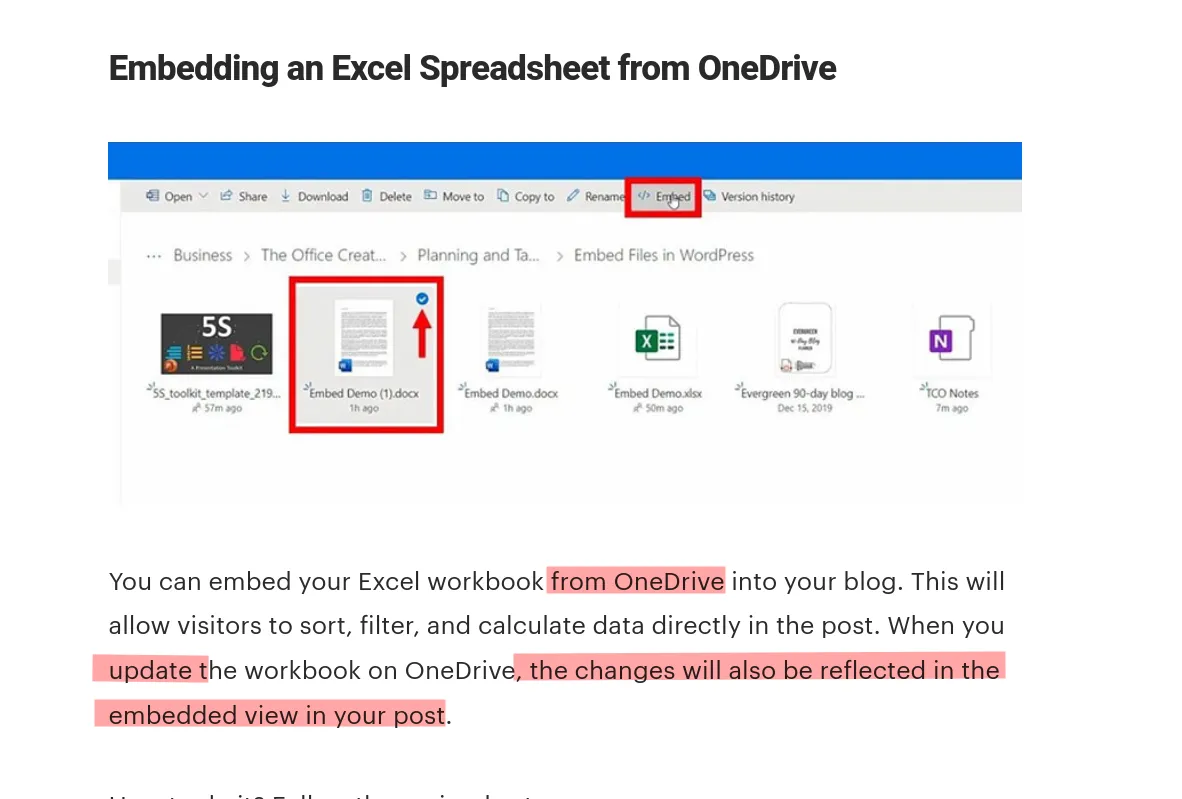
The most classy way for embedding Excel in WordPress is through wpDataTables, the best WordPress plugin for tables and charts.Here’s how easy it is to import Excel in WordPress:
Ending thoughts on why to embed Excel in HTML and WordPress
The main advantage of embedding Excel or Google Sheets in WordPress is that you do not have to create new spreadsheets or charts on your website or blog. Moreover, you can customize the way others see the embedded file. Follow the steps above and you can get it done effortlessly in a short amount of time.ggf ist sogar so etwas wie "ein Syncen" zw. Google-Sheets und WordPress moegliche. Wow.
Vielen Dank nochmals für diesen tollen Thread
Euer SüdTiroler

-
Servus & gfreit mi, wenn für dich was Neues dabei ist!
Jetzt mitmachen!
Sie haben noch kein Benutzerkonto auf unserer Seite? Registrieren Sie sich kostenlos und nehmen Sie an unserer Community teil!