


Hallo Zusammen
Ich nutze WooCommerce und habe schon einige Anpassungen gemacht. Aktuell werden die Preise und MWST, insbesondere die Gesamtpreise im Onlineshop jeweils auf 0.05 Stellen gerundet. Dies mache ich mit der PHP-Funktion "ceil":
add_filter( 'woocommerce_calculated_total', 'custom_calculated_total' );
function custom_calculated_total( $total ) {
$total = ceil ( $total / 0.05 ) * 0.05;
return $total;
}


add_filter('woocommerce_calculated_subtotal', 'custom_subcalculated_total');
function custom_subcalculated_total( $total ) {
$total = ceil ( $total / 0.05 ) * 0.05;
return $total;
}Was mir auffällt ist, dass wenn ich zb. einen Gutschein eintrage mit 5% Rabatt, zeigt dieser mir auch wieder zb. 9.41 an anstatt 9.40 oder wenn ich ein Wert von 10.- eingebe, dann 10.01 an anstatt 10.-.
Doch was mir wirklich am Herzen liegt ist die Rundung in der manuellen Bestelleingabe.
Wenn wir im backend bestehende Bestellungen bearbeiten möchten (zb. neues Produkt hinzufügen, Versand hinzufügen, anzahl ändern ,etc.) werden da die Beträge, MwSt., Gesamttotal neu berechnet. Hier aber alles in wilder Form wie zb. 105.27 oder 210.79. Wie kriege ich es hin, dass diese Beträge ebenfalls gerundet werden? Sieht sonst sehr unschön aus! Wenn auf "Neu Berechnene" geklickt wird, sind die ungerundeten unnd unschönen Beträge auch in der neuen Rechnung drauf.
Ich habe das mit dieser Funktion in der "functions.php" versucht, aber ohne Erfolg. 
function calculate_totals( $and_taxes = true ) {
    do_action( 'woocommerce_order_before_calculate_totals', $and_taxes, $order );


    $fees_total        = 0;
    $shipping_total    = 0;
    $cart_subtotal_tax = 0;
    $cart_total_tax    = 0;


    $cart_subtotal = $order->get_cart_subtotal_for_order();
    $cart_total    = $order->get_cart_total_for_order();


    // Sum shipping costs.
    foreach ( $order->get_shipping_methods() as $shipping ) {
        $shipping_total += round( $shipping->get_total(), wc_get_price_decimals() );
    }


    $order->set_shipping_total( $shipping_total );


    // Sum fee costs.
    foreach ( $order->get_fees() as $item ) {
        $fee_total = $item->get_total();


        if ( 0 > $fee_total ) {
            $max_discount = round( $cart_total + $fees_total + $shipping_total, wc_get_price_decimals() ) * -1;


            if ( $fee_total < $max_discount && 0 > $max_discount ) {
                $item->set_total( $max_discount );
            }
        }
        $fees_total += $item->get_total();
    }


    // Calculate taxes for items, shipping, discounts. Note; this also triggers save().
    if ( $and_taxes ) {
        $order->calculate_taxes();
    }


    // Sum taxes again so we can work out how much tax was discounted. This uses original values, not those possibly rounded to 2dp.
    foreach ( $order->get_items() as $item ) {
        $taxes = $item->get_taxes();


        foreach ( $taxes['total'] as $tax_rate_id => $tax ) {
            $cart_total_tax += (float) $tax;
        }


        foreach ( $taxes['subtotal'] as $tax_rate_id => $tax ) {
            $cart_subtotal_tax += (float) $tax;
        }
    }


    $order->set_discount_total( ceil( $cart_subtotal - $cart_total, wc_get_price_decimals()
 / 0.05) * 0.05 );
    $order->set_discount_tax( wc_round_tax_total( $cart_subtotal_tax - $cart_total_tax ) );
    $order->set_total( ceil($cart_total / 0.05) * 0.05 + ceil($fees_total / 0.05) * 0.05 + ceil($order->get_shipping_total() / 0.05) * 0.05 + ceil($order->get_cart_tax() / 0.05) * 0.05 + $order->get_shipping_tax(), wc_get_price_decimals() ) );


    do_action( 'woocommerce_order_after_calculate_totals', $and_taxes, $order );


    $order->save();


    return $order->get_total();
}Ich selber hab keine Idee mehr, kann mir vielleicht jemand helfen?
Hier beim Bild, das Rot eingekreiste sollte gerundet werden auf 0.05 stellen. Also entweder auf- oder ab.
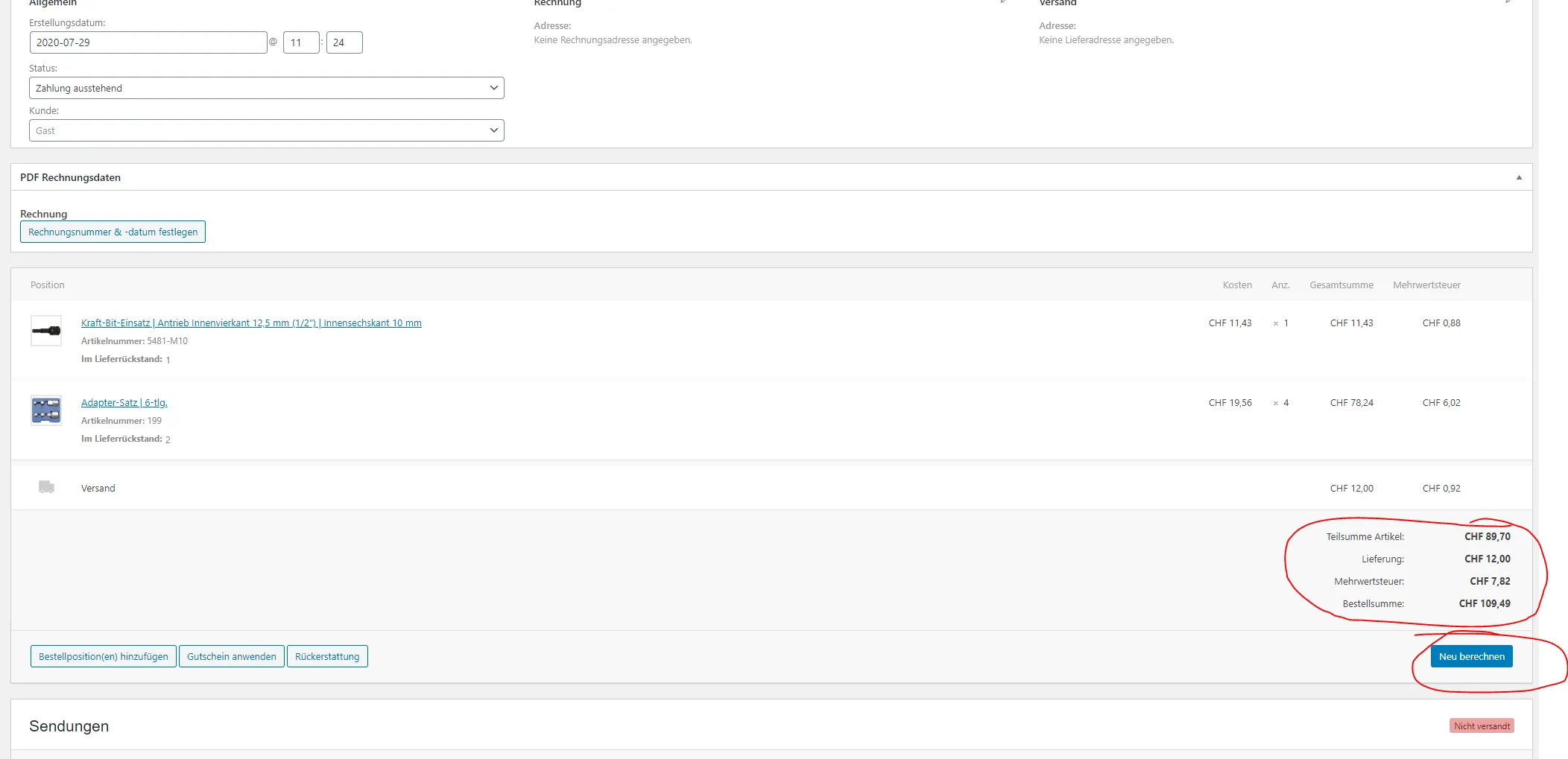
[Blockierte Grafik: https://ibb.co/1RqbfWp]
Die Preise im gesamten Onlineshop werden inkl. MwSt. angezeigt.
Ich bin für jede Hilfe dankbar!
Danke

 Danke für das Beispiel, ich werde mich heute Nachmittag ransetzen (sobald die Server-Migration durch ist).