WooCommerce Preis "ab"

  • Hallo,

    ich bin gerade dabei, meinen Onlineshop aufzubauen. Da ich mehrere variable Produkte anbiete, habe ich per Code erreicht, das im Shop z.B. ab 20€ angezeigt wird, also nicht von-bis.

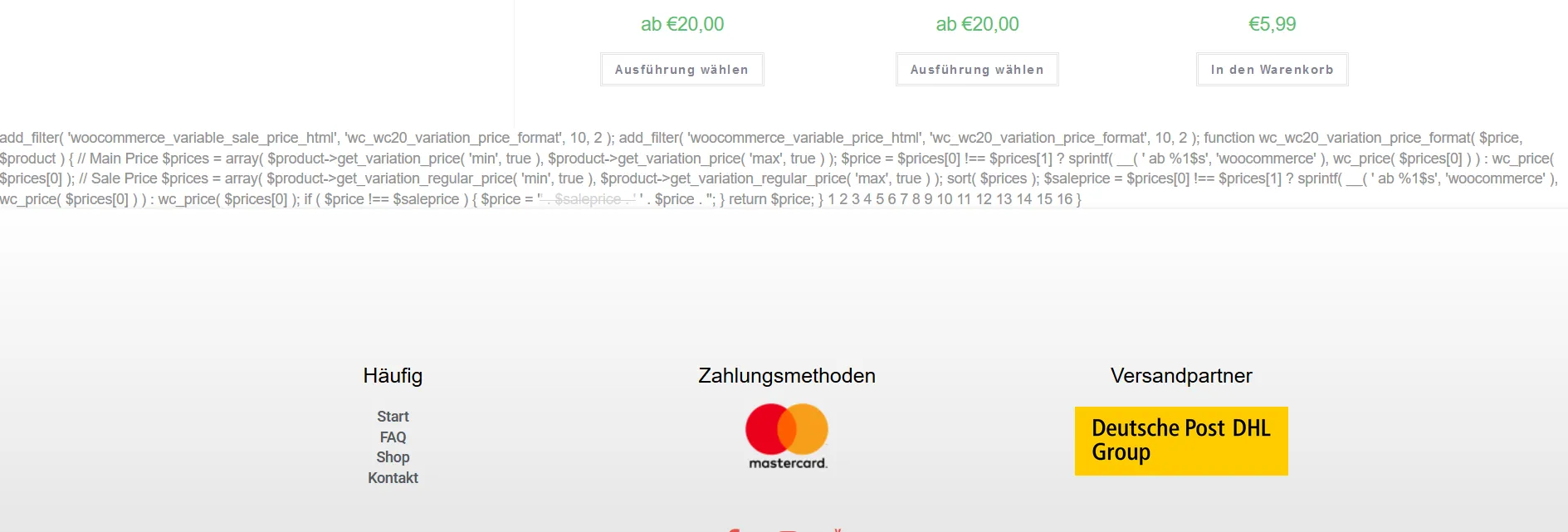
    Mein Prolem ist nun, dass ganz unten im Shop (Archiv wie auch Einzelproduktansicht) folgender Code angezeigt wird.

    `add_filter( 'woocommerce_variable_sale_price_html', 'wc_wc20_variation_price_format', 10, 2 ); add_filter( 'woocommerce_variable_price_html', 'wc_wc20_variation_price_format', 10, 2 ); function wc_wc20_variation_price_format( $price, $product ) { // Main Price $prices = array( $product->get_variation_price( 'min', true ), $product->get_variation_price( 'max', true ) ); $price = $prices[0] !== $prices[1] ? sprintf( __( ' ab %1$s', 'woocommerce' ), wc_price( $prices[0] ) ) : wc_price( $prices[0] ); // Sale Price $prices = array( $product->get_variation_regular_price( 'min', true ), $product->get_variation_regular_price( 'max', true ) ); sort( $prices ); $saleprice = $prices[0] !== $prices[1] ? sprintf( __( ' ab %1$s', 'woocommerce' ), wc_price( $prices[0] ) ) : wc_price( $prices[0] ); if ( $price !== $saleprice ) { $price = '' . $saleprice . ' ' . $price . ''; } return $price; } 1 2 3 4 5 6 7 8 9 10 11 12 13 14 15 16 }`

    Hat jemand eine Idee, wie ich den aus dem Store löschen kann? Habe via Snippet auch die Änderung deaktiviert, aber leider steht der Code jetzt dauerhaft ganz unten.

    Danke (=
    • Anzeige

    Hallo!

    Wenn du gerade an deiner Website arbeitest oder dein aktuelles Hosting überdenkst: Wir betreiben mit NetzLiving eine Hosting-Plattform, die speziell auf Performance, Sicherheit und einfache Verwaltung ausgelegt ist.

    • ✔️ Schnelle Ladezeiten (optimiert für WordPress & Co.)
    • ✔️ Deutsche Server & DSGVO-konform
    • ✔️ Persönlicher Support (kein 0815-Ticket-System)

    Mehr erfahren

  • Hi,

    ich habe folgenden Code via dem Snippet-PlugIn eingefügt:

    add_filter( 'woocommerce_variable_sale_price_html', 'wc_wc20_variation_price_format', 10, 2 );
    add_filter( 'woocommerce_variable_price_html', 'wc_wc20_variation_price_format', 10, 2 );
    function wc_wc20_variation_price_format( $price, $product ) {
    // Main Price
    $prices = array( $product->get_variation_price( 'min', true ), $product->get_variation_price( 'max', true ) );
    $price = $prices[0] !== $prices[1] ? sprintf( __( ' ab %1$s', 'woocommerce' ), wc_price( $prices[0] ) ) : wc_price( $prices[0] );
    // Sale Price
    $prices = array( $product->get_variation_regular_price( 'min', true ), $product->get_variation_regular_price( 'max', true ) );
    sort( $prices );
    $saleprice = $prices[0] !== $prices[1] ? sprintf( __( ' ab %1$s', 'woocommerce' ), wc_price( $prices[0] ) ) : wc_price( $prices[0] );
    if ( $price !== $saleprice ) {
    $price = '<del>' . $saleprice . '</del> <ins>' . $price . '</ins>';
    }
    return $price;
    }


    Könntest du mir das etwas genauer mit der functions.php erklären? Bin leider blutiger Anfänger und etwas hilflos gerade. Soweit funktioniert ja alles, nur der Code wird im Shop unten angezeigt.

    Danke & Gruß

  • ah jetzt verstehe ich dein Problem ,))

    der Schnippsel add_filter( 'woocommerce_variable_sale_price_html', 'wc_wc20_variation_price_format', 10, 2 ); usw.

    sollte in die function.php deines theme eingefügt werden (wie das geht, frage tante goo... dafür gibt es genug infos)
    am besten in dein child theme.

    passe auf die richtige formatierung auf

  • Meine derzeitige Lieblings-Antwort: Kommt drauf an!

    In welchen Dateien bzw. wie hast Du das Snippet hinzugefügt? Bist Du Dir sicher, dass Du beim rumprobieren nicht mehrere Dateien ausprobiert hast, und dieser irrtümlich noch wo anders existiert?

    Solche Anpassungen sollte man "nur" in der functions.php Deines "Child-Themes" durchführen!

    Wie hast Du das Snippet deaktiviert? Normalerweise sollte am Anfang ein /* und am Schluss des Snippets ein */ eingefügt werden! Ein // ist nicht zielführend.

    Solltest Du nicht mehr selbst aus dem Schlamassel kommen, kannst Du jederzeit einen Auftrag für eine professionelle Unterstützung in der Jobbörse vergeben!

    LG

Jetzt mitmachen!

Sie haben noch kein Benutzerkonto auf unserer Seite? Registrieren Sie sich kostenlos und nehmen Sie an unserer Community teil!