.HTACCESS verändert sich automatisch immer Samstags

  • Hallo zusammen,

    ich habe folgendes Problem.
    Jede Woche Samstag gegen 9:26 verschwindet aus meiner htaccess Datei folgender Code:

    # BEGIN WordPress
    # Die Anweisungen (Zeilen) zwischen „BEGIN WordPress“ und „END WordPress“ sind
    # dynamisch generiert und sollten nur über WordPress-Filter geändert werden.
    # Alle Änderungen an den Anweisungen zwischen diesen Markierungen werden überschrieben.
    <IfModule mod_rewrite.c>
    RewriteEngine On
    RewriteRule .* - [E=HTTP_AUTHORIZATION:%{HTTP:Authorization}]
    RewriteBase /
    RewriteRule ^index\.php$ - [L]
    RewriteCond %{REQUEST_FILENAME} !-f
    RewriteCond %{REQUEST_FILENAME} !-d
    RewriteRule . /index.php [L]
    </IfModule>

    # END WordPress

    Danach laufen alle Unterseiten in 404 Error. Wenn ich die Zeilen wieder hinzufüge, gehts wieder.

    Ich nutze WP-Space als Hoster mit deren größtem Paket. PHP 8.1 - Redis Cache - AccelerateWP Cache

    Kennt ihr das verhalten? Durch was kann es ausgelöst werden?

    LG Daniel

    • Anzeige

    Hallo!

    Wenn du gerade an deiner Website arbeitest oder dein aktuelles Hosting überdenkst: Wir betreiben mit NetzLiving eine Hosting-Plattform, die speziell auf Performance, Sicherheit und einfache Verwaltung ausgelegt ist.

    • ✔️ Schnelle Ladezeiten (optimiert für WordPress & Co.)
    • ✔️ Deutsche Server & DSGVO-konform
    • ✔️ Persönlicher Support (kein 0815-Ticket-System)

    Mehr erfahren

  • Hier die Ganze htaccess:

    HTML:

    # BEGIN AccelerateWP
    # Use UTF-8 encoding for anything served text/plain or text/html
    AddDefaultCharset UTF-8
    # Force UTF-8 for a number of file formats
    <IfModule mod_mime.c>
    AddCharset UTF-8 .atom .css .js .json .rss .vtt .xml
    </IfModule>

    # FileETag None is not enough for every server.
    <IfModule mod_headers.c>
    Header unset ETag
    </IfModule>

    # Since we’re sending far-future expires, we don’t need ETags for static content.
    # developer.yahoo.com/performance/rules.html#etags
    FileETag None

    # Send CORS headers if browsers request them; enabled by default for images.
    <IfModule mod_setenvif.c>
    <IfModule mod_headers.c>
    # mod_headers, y u no match by Content-Type?!
    <FilesMatch "\.(avifs?|cur|gif|png|jpe?g|svgz?|ico|webp)$">
    SetEnvIf Origin ":" IS_CORS
    Header set Access-Control-Allow-Origin "*" env=IS_CORS
    </FilesMatch>
    </IfModule>
    </IfModule>

    # Allow access to web fonts from all domains.
    <FilesMatch "\.(eot|otf|tt[cf]|woff2?)$">
    <IfModule mod_headers.c>
    Header set Access-Control-Allow-Origin "*"
    </IfModule>
    </FilesMatch>

    <IfModule mod_alias.c>
    <FilesMatch "\.(html|htm|rtf|rtx|txt|xsd|xsl|xml)$">
    <IfModule mod_headers.c>
    Header set X-Powered-By "AccelerateWP"
    Header unset Pragma
    Header append Cache-Control "public"
    Header unset Last-Modified
    </IfModule>
    </FilesMatch>

    <FilesMatch "\.(css|htc|js|asf|asx|wax|wmv|wmx|avi|bmp|class|divx|doc|docx|eot|exe|gif|gz|gzip|ico|jpg|jpeg|jpe|json|mdb|mid|midi|mov|qt|mp3|m4a|mp4|m4v|mpeg|mpg|mpe|mpp|otf|odb|odc|odf|odg|odp|ods|odt|ogg|pdf|png|pot|pps|ppt|pptx|ra|ram|svg|svgz|swf|tar|tif|tiff|ttf|ttc|wav|wma|wri|xla|xls|xlsx|xlt|xlw|zip)$">
    <IfModule mod_headers.c>
    Header unset Pragma
    Header append Cache-Control "public"
    </IfModule>
    </FilesMatch>
    </IfModule>

    <IfModule mod_mime.c>
    AddType image/avif avif
    AddType image/avif-sequence avifs
    </IfModule>
    # Expires headers (for better cache control)
    <IfModule mod_expires.c>
    ExpiresActive on
    ExpiresDefault "access plus 1 month"
    # cache.appcache needs re-requests in FF 3.6 (thanks Remy ~Introducing HTML5)
    ExpiresByType text/cache-manifest "access plus 0 seconds"
    # Your document html
    ExpiresByType text/html "access plus 0 seconds"
    # Data
    ExpiresByType text/xml "access plus 0 seconds"
    ExpiresByType application/xml "access plus 0 seconds"
    ExpiresByType application/json "access plus 0 seconds"
    # Feed
    ExpiresByType application/rss+xml "access plus 1 hour"
    ExpiresByType application/atom+xml "access plus 1 hour"
    # Favicon (cannot be renamed)
    ExpiresByType image/x-icon "access plus 1 week"
    # Media: images, video, audio
    ExpiresByType image/gif "access plus 4 months"
    ExpiresByType image/png "access plus 4 months"
    ExpiresByType image/jpeg "access plus 4 months"
    ExpiresByType image/webp "access plus 4 months"
    ExpiresByType video/ogg "access plus 4 months"
    ExpiresByType audio/ogg "access plus 4 months"
    ExpiresByType video/mp4 "access plus 4 months"
    ExpiresByType video/webm "access plus 4 months"
    ExpiresByType image/avif "access plus 4 months"
    ExpiresByType image/avif-sequence "access plus 4 months"
    # HTC files (css3pie)
    ExpiresByType text/x-component "access plus 1 month"
    # Webfonts
    ExpiresByType font/ttf "access plus 4 months"
    ExpiresByType font/otf "access plus 4 months"
    ExpiresByType font/woff "access plus 4 months"
    ExpiresByType font/woff2 "access plus 4 months"
    ExpiresByType image/svg+xml "access plus 4 months"
    ExpiresByType application/vnd.ms-fontobject "access plus 1 month"
    # CSS and JavaScript
    ExpiresByType text/css "access plus 1 year"
    ExpiresByType application/javascript "access plus 1 year"
    </IfModule>
    # Gzip compression
    <IfModule mod_deflate.c>
    # Active compression
    SetOutputFilter DEFLATE
    # Force deflate for mangled headers
    <IfModule mod_setenvif.c>
    <IfModule mod_headers.c>
    SetEnvIfNoCase ^(Accept-EncodXng|X-cept-Encoding|X{15}|~{15}|-{15})$ ^((gzip|deflate)\s*,?\s*)+|[X~-]{4,13}$ HAVE_Accept-Encoding
    RequestHeader append Accept-Encoding "gzip,deflate" env=HAVE_Accept-Encoding
    # Don’t compress images and other uncompressible content
    SetEnvIfNoCase Request_URI \
    \.(?:gif|jpe?g|png|rar|zip|exe|flv|mov|wma|mp3|avi|swf|mp?g|mp4|webm|webp|pdf)$ no-gzip dont-vary
    </IfModule>
    </IfModule>

    # Compress all output labeled with one of the following MIME-types
    <IfModule mod_filter.c>
    AddOutputFilterByType DEFLATE application/atom+xml \
    application/javascript \
    application/json \
    application/rss+xml \
    application/vnd.ms-fontobject \
    application/x-font-ttf \
    application/xhtml+xml \
    application/xml \
    font/opentype \
    image/svg+xml \
    image/x-icon \
    text/css \
    text/html \
    text/plain \
    text/x-component \
    text/xml
    </IfModule>
    <IfModule mod_headers.c>
    Header append Vary: Accept-Encoding
    </IfModule>
    </IfModule>

    <IfModule mod_mime.c>
    AddType text/html .html_gzip
    AddEncoding gzip .html_gzip
    </IfModule>
    <IfModule mod_setenvif.c>
    SetEnvIfNoCase Request_URI \.html_gzip$ no-gzip
    </IfModule>

    <IfModule mod_rewrite.c>
    RewriteEngine On
    RewriteBase /
    RewriteCond %{HTTPS} on [OR]
    RewriteCond %{SERVER_PORT} ^443$ [OR]
    RewriteCond %{HTTP:X-Forwarded-Proto} https
    RewriteRule .* - [E=WPR_SSL:-https]
    RewriteCond %{HTTP:Accept-Encoding} gzip
    RewriteRule .* - [E=WPR_ENC:_gzip]
    RewriteCond %{REQUEST_METHOD} GET
    RewriteCond %{QUERY_STRING} =""
    RewriteCond %{HTTP:Cookie} !(wordpress_logged_in_.+|wp-postpass_|wptouch_switch_toggle|comment_author_|comment_author_email_) [NC]
    RewriteCond %{REQUEST_URI} !^(/(?:.+/)?feed(?:/(?:.+/?)?)?$|/(?:.+/)?embed/|/pixiweb-admin-login/|/kasse/??(.*)|/warenkorb/?|/mein-account/??(.*)|/wc-api/v(.*)|/(index.php/)?(.*)wp-json(/.*|$))$ [NC]
    RewriteCond %{HTTP_USER_AGENT} !^(facebookexternalhit|WhatsApp).* [NC]
    RewriteCond "%{DOCUMENT_ROOT}/wp-content/cache/wp-rocket/%{HTTP_HOST}%{REQUEST_URI}/index%{ENV:WPR_SSL}%{ENV:WPR_WEBP}.html%{ENV:WPR_ENC}" -f
    RewriteRule .* "/wp-content/cache/wp-rocket/%{HTTP_HOST}%{REQUEST_URI}/index%{ENV:WPR_SSL}%{ENV:WPR_WEBP}.html%{ENV:WPR_ENC}" [L]
    </IfModule>
    # END AccelerateWP

    # BEGIN WordPress
    # Die Anweisungen (Zeilen) zwischen „BEGIN WordPress“ und „END WordPress“ sind
    # dynamisch generiert und sollten nur über WordPress-Filter geändert werden.
    # Alle Änderungen an den Anweisungen zwischen diesen Markierungen werden überschrieben.
    <IfModule mod_rewrite.c>
    RewriteEngine On
    RewriteRule .* - [E=HTTP_AUTHORIZATION:%{HTTP:Authorization}]
    RewriteBase /
    RewriteRule ^index\.php$ - [L]
    RewriteCond %{REQUEST_FILENAME} !-f
    RewriteCond %{REQUEST_FILENAME} !-d
    RewriteRule . /index.php [L]
    </IfModule>

    # END WordPress

  • ich habe folgendes Problem.
    Jede Woche Samstag gegen 9:26 verschwindet aus meiner htaccess Datei folgender Code:

    evtl. ist es ein Cronjob, der die htaccess "jede Woche Samstag gegen 9:26" verändert.
    Cron Jobs kann man sich anzeigen lassen
    https://de.wordpress.org/plugins/wp-crontrol/

    Ich selbst mag es nicht, wenn sich andere meine Konfigurationsdateien sich ansehen können

    Code
    <files .htaccess>
       <IfModule mod_authz_core.c>
           Require all denied
       </IfModule>
       <IfModule !mod_authz_core.c>
           Order allow,deny
           Deny from all
       </IfModule>
    </files>

    und erst recht nicht die wp-config.php

    Code
    <files wp-config.php>
       <IfModule mod_authz_core.c>
           Require all denied
       </IfModule>
       <IfModule !mod_authz_core.c>
           Order allow,deny
           Deny from all
       </IfModule>
    </files>

    nach den letzten Änderungen nehme ich dann ALLEN die Schreibrechte für die Datei mit chmod 444

    Mit offenen Augen träumen

  • evtl. ist es ein Cronjob, der die htaccess "jede Woche Samstag gegen 9:26" verändert.
    Cron Jobs kann man sich anzeigen lassen
    https://de.wordpress.org/plugins/wp-crontrol/

    Ich selbst mag es nicht, wenn sich andere meine Konfigurationsdateien sich ansehen können

    Code
    <files .htaccess>
       <IfModule mod_authz_core.c>
           Require all denied
       </IfModule>
       <IfModule !mod_authz_core.c>
           Order allow,deny
           Deny from all
       </IfModule>
    </files>

    und erst recht nicht die wp-config.php

    Code
    <files wp-config.php>
       <IfModule mod_authz_core.c>
           Require all denied
       </IfModule>
       <IfModule !mod_authz_core.c>
           Order allow,deny
           Deny from all
       </IfModule>
    </files>

    nach den letzten Änderungen nehme ich dann ALLEN die Schreibrechte für die Datei mit chmod 444

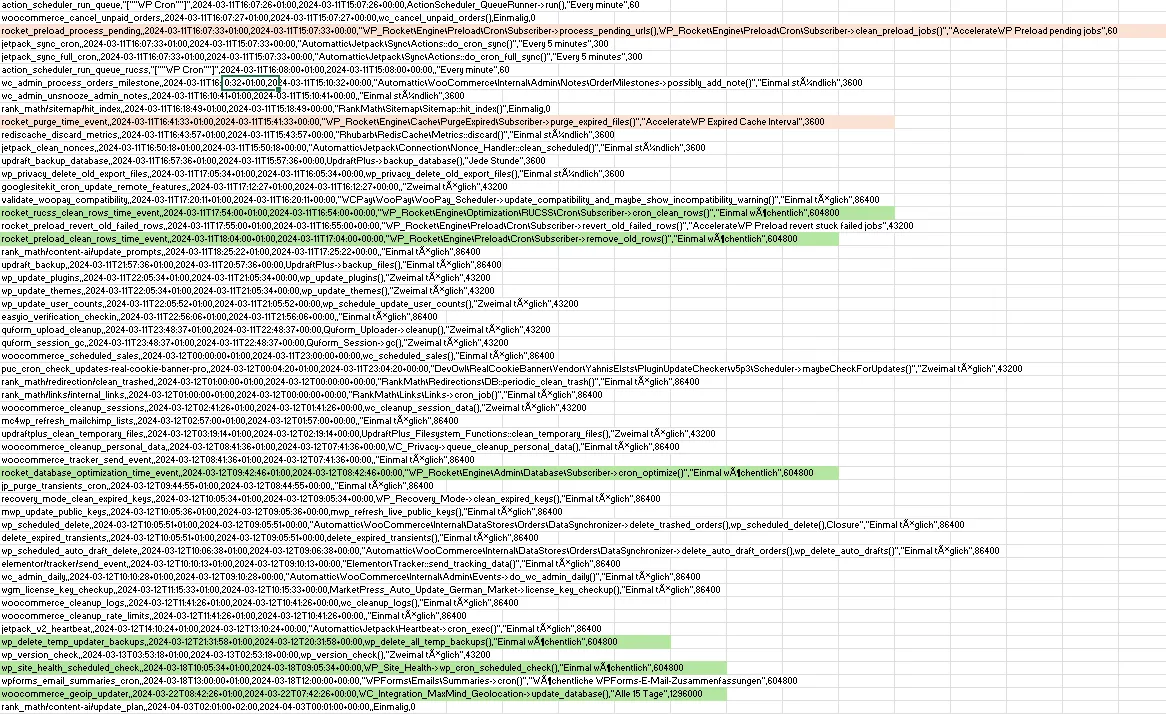
    Hab es geprüft aber Cronjobs laufen nicht zu der Zeit + Jetzt tritt es willkürlich min. 1 die Woche auf.
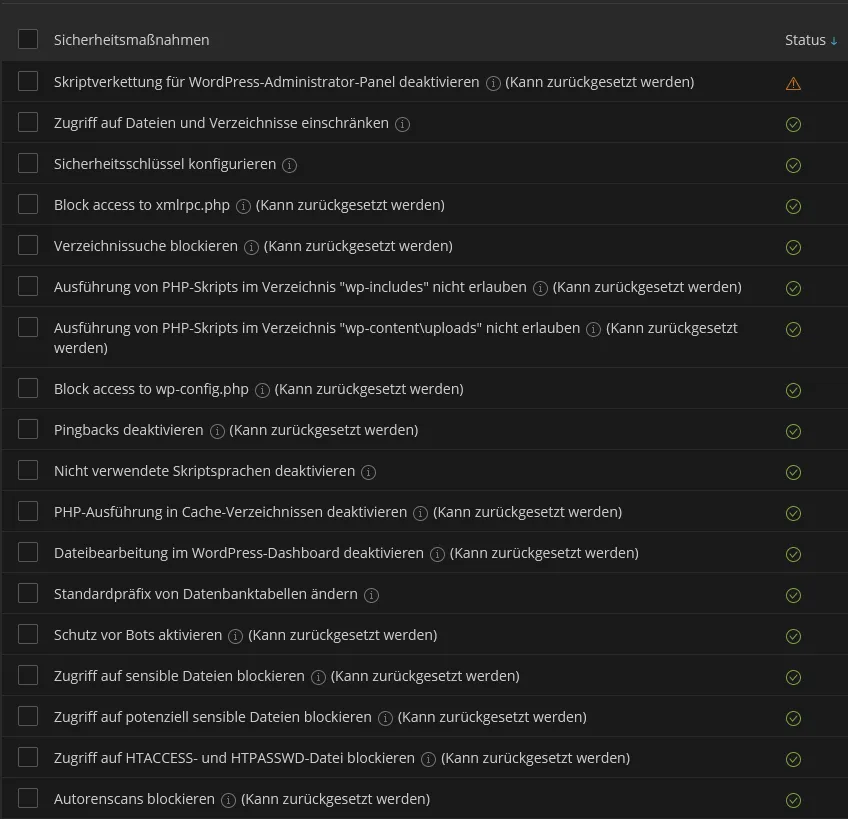
    Ich habe diverse Settings in WP-Space eingeschaltet. Kann es damit zusammenhängen ? Oder iwas mit der REST-API? Immer wenn der Code raus ist läuft die Website aber z.B. die FIlter funktion vom Shop geht nicht mehr.
    https://prnt.sc/6daX-QsQeTf9

  • Hab es geprüft aber Cronjobs laufen nicht zu der Zeit

    Mit Cronjobs meine ich die WordPress Cronjobs und die laufen oft... sehr oft. Und die kannst du nur prüfen, wenn du das genannte Plugin installierst. Oder erkläre, wie du die cronjobs in WordPress geprüft hast

    ^- ernst haft - wer klickt auf so etwas?

    Mit offenen Augen träumen

    Einmal editiert, zuletzt von r23 (9. März 2024 um 10:11)

  • Mit Cronjobs meine ich die WordPress Cronjobs und die laufen oft... sehr oft. Und die kannst du nur prüfen, wenn du das genannte Plugin installierst. Oder erkläre, wie du die cronjobs in WordPress geprüft hast


    ^- ernst haft - wer klickt auf so etwas?

    Ich habe das Plugin installiert und auch nachgeschaut, nichts Auffälliges, kenne mich aber auch zuwenig aus:

    Der Link den ich gepostet habe beinhaltet Settings aus dem WP Toolkit, dachte evtl. hängt es mit einer der Settings zusammen:

  • Frage dort nach, welche Einstellungen [FONT=Courier New].htaccess[/FONT] beeinflussen und deaktiviere diese. Weiterhin deaktiviere AccelerateWP wie auch in Antwort #3 oben beschrieben, passiert es dann auch?

    Ich würde es gerne testen, aber will die Website (Shop) aktuell nicht ohne Caching laufen lassen :/ Der Hoster meint, liegt evtl. an einer Inkompatibilität mit einem der installierten Plugins...

  • Frage beim Hoster nach, welche WP Toolkit Einstellungen [FONT=Courier New].htaccess[/FONT] beeinflussen und deaktiviere diese.

    Auf das Plugin Jetpack, das im Cronjob Screenshot sichtbar ist, sollte man ggf. generell verzichten. Nahezu alle Funktionen sind nicht DSGVO konform nutzbar und manche Funktionen kommen sich auch mit anderen Cache Lösungen in die Quere.

  • Frage beim Hoster nach, welche WP Toolkit Einstellungen [FONT=Courier New].htaccess[/FONT] beeinflussen und deaktiviere diese.

    Auf das Plugin Jetpack, das im Cronjob Screenshot sichtbar ist, sollte man ggf. generell verzichten. Nahezu alle Funktionen sind nicht DSGVO konform nutzbar und manche Funktionen kommen sich auch mit anderen Cache Lösungen in die Quere.

    Das Jetpack Plugin hatte ich mal installiert, ist aber schon seit wochen deinstalliert. Warum da noc ein Cron drin ist weis ich leider nicht..

Jetzt mitmachen!

Sie haben noch kein Benutzerkonto auf unserer Seite? Registrieren Sie sich kostenlos und nehmen Sie an unserer Community teil!