


Barcode Scanner with Inventory & Order Manager, damit geht es sehr gut. Er findet gleich das Produkt und man kann gleich den Warenbestand aendern.
Aber musste noch das Plugin EAN for WooCommerce installieren um ein Barcode fuer die Produkte zu erstellen.
Beiträge von cydia
-
-
Hallo,
kann ich eine von mir angelegte PDF Datei an die Mail die in der Bestellung ist senden aber ohne das ich mich in den Mailaccount einloggen muss. Also in der Bestellung rein, da wo der Kunde eine Mail hinterlassen hat wäre toll wenn es ein Button gibt wo ich dem Verkäufer eine Mail mit PDF Anhang versenden kann...
Wie ich sehe gibt es Plugins dafür aber mann kann nur die PDF´s versenden die man im Plugin erstellt (also Rechnungen).
-
Hallo,
ja, danke. Habe 2 Plugins genommen und jetzt geht alles super.
-
Hallo,
wenn ich die Anzahl der Produkte aktualisieren möchte, muss ich ja in Woocommerce erstmal das Produkt finden (z.Bsp. das Produkt in der Suche nach Keywörtern) und dann die Anzahl ändern.
Weil jedes Produkt schon ein Barcode auf den Verpackungen hat, würde ich gerne mir den Aufwand erleichtern mit einem Barcode-Scanner wenn es denn möglich ist.
Wie mache ich es mit den Barcode-Scanner? Wie verbindet er sich mit Woocommerce? Muß ich in Woocommerce ein extra Plugin installieren?
Und wie ich sehe kann man auch das Handy (iPhone) als Barcode-Scanner benutzen, nur kann man irgendwie es mit Woocommerce verbinden? Mit dem Programm Barcode to PC server kann ich es auf dem iMac/PC übertragen, aber geht es gleich in Woocommerce und das er mir gleich das Produkt anzeigt?
Und noch eine Frage, ich hoffe ich kann es gut erklären, habe bisher noch nicht mit dem Lagerbestand gearbeitet, würde es jetzt aber machen, aber den Lagerbestand immer aktualisieren und das man auf Nachfrage die Produkte bestellen kann.
Also wenn ich bei einem Produkt X 0 Warenbestand habe und einer bestellt es, dann bekomme ich Mails das, dass Produkt X nicht da ist und das 1 Bestellung für das Produkt vorliegt, so weit so gut, doch gibt es denn eine Option das ich diese Produkte die nicht im Lager sind und die bestellt worden sind in einer Excel, oder wo auch immer, exportiert werden? Dann weiss ich ja gleich was ich besorgen/bestellen soll, ohne jede einzelne Bestellung zu prüfen... -
Hallo, brauche so was in der Art:
[Blockierte Grafik: https://i.postimg.cc/9F0gXx0k/37e93595-a762-4bec-9c1e-3d8f12f9723d.jpg]
[Blockierte Grafik: https://i.postimg.cc/kXH12xtg/Slika-zaslona-2022-01-02-u-23-09-09.png]
Gibt es sowas mit Templates/Plugins?
-

Sollten die Emails im Spam landen check mal die IP und das Domain auf Spam.
https://network-tools.com/spam-blacklist/
EDIT: Ah jetzt geht es und da steht:We are seeing if IP: 188.68.47.169 is blacklisted
bl.spamcop.net has not blacklisted this IP.
sbl.spamhaus.org has not blacklisted this IP.
xbl.spamhaus.org has not blacklisted this IP.
zen.spamhaus.org has not blacklisted this IP.
psbl.surriel.com has not blacklisted this IP.Also anscheinend alles gut?
-
Hallo, erstmal Danke! Werde mich mal schlau machen. Habe davon noch keine Ahnung.
Komischerweise sagt mir mail-tester.com das es 10/10 ist? -
Hallo, benutze WP Mail SMTP für Woocommerce, habe diese Nachricht heute bekommen:
Heads up! The last email your site attempted to send was unsuccessful.
Email Source: WooCommerce
Mailer: Other SMTP
SMTP connect() failed. https://github.com/PHPMailer/PHPMailer/wiki/Troubleshooting
For more details please try running an Email Test or reading the latest error event.TypeError
Date20. studenoga 2021. at 12:21
Content
Mailer: Other SMTP SMTP connect() failed. https://github.com/PHPMailer/PHPMailer/wiki/Troubleshooting
Source
WooCommerce
/var/www/vhosts/hosting119150.a2fa9.netcup.net/httpdocs/wp-content/plugins/woocommerce/includes/emails/class-wc-email.php (line: 655)Was genau bedeutet das?
Und noch eine Frage, viele meine Mails die ich sende gehen bei anderen im SPAM Ordner, gibt es da eine Möglichkeit das es nicht mehr der Fall ist?
-
Hallo, was genau ist hier das Problem?!:
Heads up! The last email your site attempted to send was unsuccessful.
Email Source: Contact Form 7
Mailer: Other SMTP
SMTP Error: data not accepted.
For more details please try running an Email Test or reading the latest error event.Debug Event Details
TypeError
Date11. rujna 2021. at 9:32
Content
Mailer: Other SMTP SMTP Error: data not accepted.
Source
Contact Form 7
/var/www/vhosts/hosting119150.a2fa9.netcup.net/httpdocs/wp-content/plugins/contact-form-7/includes/mail.php (line: 194)Ist da was mit dem Hoster los oder?
-
Habe es jetzt in der deutschen Sprache umgestellt und die Nachricht lautet jetzt für die Sprachaktualisierungen:
CodeAktualisierung der Übersetzungen für WooCommerce (de_DE) … Die Aktualisierung konnte nicht installiert werden, da einige Dateien nicht kopiert werden konnten. Dies liegt meist an inkonsistenten Dateiberechtigungen. /var/www/vhosts/hosting119150.a2fa9.netcup.net/httpdocs/wp-content/languages/plugins/woocommerce-de_DE-54eeb3eb5fc5dc8020a846f52fbf5410.json, /var/www/vhosts/hosting119150.a2fa9.netcup.net/httpdocs/wp-content/languages/plugins/woocommerce-de_DE-6bf5779eb20eac35d1dc78e7cbabd993.json, /var/www/vhosts/hosting119150.a2fa9.netcup.net/httpdocs/wp-content/languages/plugins/woocommerce-de_DE-82b438796f7c2c00cfb0b758363e7042.json, /var/www/vhosts/hosting119150.a2fa9.netcup.net/httpdocs/wp-content/languages/plugins/woocommerce-de_DE-8b4482f429cb0d7ae18da3a106e32a1d.json, /var/www/vhosts/hosting119150.a2fa9.netcup.net/httpdocs/wp-content/languages/plugins/woocommerce-de_DE-b098a917f23af14c307bc89b1315744d.json, /var/www/vhosts/hosting119150.a2fa9.netcup.net/httpdocs/wp-content/languages/plugins/woocommerce-de_DE-db34a5584f5a5c7ba52bdad29c1ac647.jsonUnd wenn ich das Plugin "Social Reviews & Recommendations" installieren will:
CodeInstallation fehlgeschlagen: Die Aktualisierung konnte nicht installiert werden, da einige Dateien nicht kopiert werden konnten. Dies liegt meist an inkonsistenten Dateiberechtigungen.Und alles ist auf dem neuesten Stand (ausser die Sprachdateien).
-
So oder so ähnlich steht es wenn ich die Sprachen updaten will in Wordpress und auch wenn ich ein neues Plugin installieren will, will er es nicht installieren, dann bekomme ich so eine Nachricht... was genau bedeutet das?
-
Hallo,
danke. Ok, habe es doch noch geschafft. (maintenance geloescht)
-
Hallo,
habe per Wordpress/Woocommerce Updates durchgefuehrt (Plugins) und jetzt zeigt meine Seite https://jeftini-top-proizvodi.com/ nur:
Auf der Website werden geplante Wartungsaufgaben durchgeführt.
Wie kann ich wieder auf meine Seite kommen? Habe auf meinem Hostinganbieter im Controlpanel Wordpress gefunden und dort Updates durchgefuehrt und da geht alles, aber direkt auf meine Seite komme ich jetzt nicht mehr...
-
Erstmal vielen Dank für die Hilfe, werde es diese Tage mal Schritt für Schritt durchgehen und versuchen zu beheben.
Eine Frage noch, heute kriege ich leider die Nachricht:
Ihre Verbindung ist nicht privat“?
Kann nicht auf die Seite?!ZitatAlles anzeigen
NET::ERR_CERT_AUTHORITY_INVALID
Subject: PleskIssuer: Plesk
Expires on: 20. pro 2019.
Current date: 2. srp 2021.
PEM encoded chain:-----BEGIN CERTIFICATE-----
MIIDPTCCAiUCBFwbqlowDQYJKoZIhvcNAQELBQAwYzELMAkGA1UEBhMCQ0gxFTAT
BgNVBAcMDFNjaGFmZmhhdXNlbjEOMAwGA1UECgwFUGxlc2sxDjAMBgNVBAMMBVBs
ZXNrMR0wGwYJKoZIhvcNAQkBFg5pbmZvQHBsZXNrLmNvbTAeFw0xODEyMjAxNDQy
MzRaFw0xOTEyMjAxNDQyMzRaMGMxCzAJBgNVBAYTAkNIMRUwEwYDVQQHDAxTY2hh
ZmZoYXVzZW4xDjAMBgNVBAoMBVBsZXNrMQ4wDAYDVQQDDAVQbGVzazEdMBsGCSqG
SIb3DQEJARYOaW5mb0BwbGVzay5jb20wggEiMA0GCSqGSIb3DQEBAQUAA4IBDwAw
ggEKAoIBAQCrsfuWH54XjZ/3teEjovOIUzkvRIyHzH6FB4K1KACz2GhiV2A/WSkz
JrBR0AKnnilYjqOND8WNjeb+mgNqeQqEi4vvb5EF0lk8njPbSam8ILsj70NqZ339
9RfyeTcLTifZMYBbOYJNClZ9YxJFPvYW1KzOFiCIGgZCZ5X3Z4p5Jn11x0dO5HCl
VALwMFYVu2HVQBegY4SgAVP7JvkrdNsvhwv9loj/e8y4zXRGtLrSqVbogZGgSfDB
3X2r/OWOU1QG0ej/UJKuxcWNNzW6kuZJvnkzGRKSpDqFOl0P1YuIB0fDP1XevTtY
L71778x3U9eZvwoil+yCOqoXXhtdYLOFAgMBAAEwDQYJKoZIhvcNAQELBQADggEB
ABt1Zb7paLxTYL3iOjH0jHvRv84exmVQ7kz2r0LMBHBJprpx0UWh/Y7kVjepFwdw
je0sQwbbS5QgX4O9sAdsHFytoCSNXk6vw3B09LP40mm1hfdmpglNevcc8j0DvuFZ
Xy/g5gtxh2FS2/aKisLAZ7H3LQXcGY0dvAoIPelSxKlBz2fWLzy8rrZY7E83whrQ
IDCcw7xLa7lB+kAGd6g1Mvgtf1MNT5+zvVAqvhExun2FFyqNR51eFhr527NaGw+T
eqV3F4t6oa5RuevD2OWflO8J/qqee+3juIorSdoWmTQXKrJsyfYGAI10c3Eis24k
hhnMPprKbHWjtTlJET1avz4=
-----END CERTIFICATE-----EDIT: Jetzt geht wieder alles.... hm... hoffe ist ist kein Hack?! Jetzt geht sogar die Seite im Backend viel schneller und flüssiger...
-
Leider ist es immer noch sehr langsam

-
Hallo, danke erstmal für deine Hilfe!
Habe ich gemacht, doch leider steht in Wordpress immer noch "WP_MEMORY_LIMIT 40M". Im Anhang wie und wo ich es eingefügt habe.
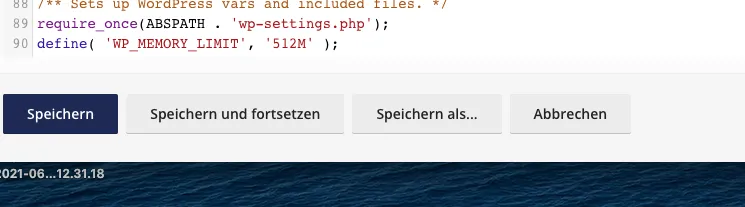
EDIT: Ach, soory, dachte einfach am Ende rein kopieren. Jetzt habe ich es wohl an der richtigen Stelle eingefügt.:
ZitatAlles anzeigen
`
### wp-core ###version: 5.7.2
site_language: hr
user_language: hr
timezone: Europe/Zagreb
permalink: /%year%/%monthnum%/%day%/%postname%/
https_status: true
multisite: false
user_registration: 0
blog_public: 1
default_comment_status: open
environment_type: production
user_count: 1319
dotorg_communication: true### wp-paths-sizes ###
wordpress_path: /var/www/vhosts/hosting119150.a2fa9.netcup.net/httpdocs
wordpress_size: 884,20 MB (927151561 bytes)
uploads_path: /var/www/vhosts/hosting119150.a2fa9.netcup.net/httpdocs/wp-content/uploads
uploads_size: 1,78 GB (1906064348 bytes)
themes_path: /var/www/vhosts/hosting119150.a2fa9.netcup.net/httpdocs/wp-content/themes
themes_size: 29,92 MB (31375224 bytes)
plugins_path: /var/www/vhosts/hosting119150.a2fa9.netcup.net/httpdocs/wp-content/plugins
plugins_size: 149,21 MB (156459040 bytes)
database_size: 343,09 MB (359755821 bytes)
total_size: 3,15 GB (3380805994 bytes)### wp-dropins (3) ###
advanced-cache.php: true
maintenance.php: true
object-cache.php: true### wp-active-theme ###
name: Astra (astra)
version: 3.6.2
author: Brainstorm Force
author_website: https://wpastra.com/about/
parent_theme: none
theme_features: core-block-patterns, astra_hooks, align-wide, automatic-feed-links, title-tag, post-thumbnails, html5, post-formats, custom-logo, customize-selective-refresh-widgets, editor-style, woocommerce, amp, wc-product-gallery-zoom, wc-product-gallery-lightbox, wc-product-gallery-slider, widgets, menus
theme_path: /var/www/vhosts/hosting119150.a2fa9.netcup.net/httpdocs/wp-content/themes/astra### wp-themes-inactive (3) ###
Storefront: version: 3.7.0, author: Automattic
Twenty Twenty: version: 1.7, author: WordPress tim
Twenty Twenty-One: version: 1.3, author: WordPress tim### wp-mu-plugins (1) ###
WP Migrate DB Compatibility: version: 1.2, author: Delicious Brains
### wp-plugins-active (23) ###
Advanced Order Export For WooCommerce: version: 3.1.9, author: AlgolPlus
Autoptimize: version: 2.8.4, author: Frank Goossens (futtta)
Checkout Field Editor for WooCommerce: version: 1.4.8, author: ThemeHigh
Contact Form 7: version: 5.4.1, author: Takayuki Miyoshi
Croatian payment slip generator for WooCommerce: version: 1.6, author: Marinela Levak
Elementor: version: 3.2.5, author: Elementor.com
Facebook for WooCommerce: version: 2.6.1, author: Facebook
FiboSearch - AJAX Search for WooCommerce: version: 1.12.0, author: FiboSearch Team
Google Tag Manager for Wordpress: version: 1.13.1, author: Thomas Geiger
Limit Login Attempts: version: 1.7.1, author: Johan Eenfeldt
MX Woocommerce HRK currency + PayPal: version: 1.1, author: Media X
OMGF: version: 4.4.3, author: Daan from FFW.Press
Starter Templates: version: 2.6.12, author: Brainstorm Force
W3 Total Cache: version: 2.1.5, author: BoldGrid
WooCommerce: version: 5.4.1, author: Automattic
WooCommerce - All in One SEO Pack: version: 1.3.4, author: Visser Labs
WooCommerce Cart Abandonment Recovery: version: 1.2.12, author: CartFlows Inc
WooCommerce Customizer: version: 2.7.4, author: SkyVerge
WPForms Lite: version: 1.6.7.2, author: WPForms
WP Mail SMTP: version: 2.9.0, author: WPForms
WPS Hide Login: version: 1.8.5, author: WPServeur, NicolasKulka, wpformation
YITH WooCommerce Wishlist: version: 3.0.23, author: YITH
Yoast SEO: version: 16.6, author: Team Yoast### wp-plugins-inactive (3) ###
Mailchimp for WooCommerce: version: 2.5.1, author: Mailchimp
Storefront Product Sharing: version: 1.0.6, author: WooCommerce
Storefront Sticky Add to Cart: version: 1.1.9, author: WooThemes### wp-media ###
image_editor: WP_Image_Editor_Imagick
imagick_module_version: 1687
imagemagick_version: ImageMagick 6.9.7-4 Q16 x86_64 20170114 http://www.imagemagick.org
file_uploads: File uploads is turned off
post_max_size: 128M
upload_max_filesize: 128M
max_effective_size: 128 MB
max_file_uploads: 20
imagick_limits:
imagick::RESOURCETYPE_AREA: 122 MB
imagick::RESOURCETYPE_DISK: 1073741824
imagick::RESOURCETYPE_FILE: 393216
imagick::RESOURCETYPE_MAP: 512 MB
imagick::RESOURCETYPE_MEMORY: 256 MB
imagick::RESOURCETYPE_THREAD: 16
gd_version: bundled (2.1.0 compatible)
ghostscript_version: 9.26### wp-server ###
server_architecture: Linux 4.9.0-12-amd64 x86_64
httpd_software: Apache
php_version: 7.4.18 64bit
php_sapi: cgi-fcgi
max_input_variables: 4000
time_limit: 180
memory_limit: 512M
max_input_time: 60
upload_max_filesize: 128M
php_post_max_size: 128M
curl_version: 7.52.1 OpenSSL/1.0.2u
suhosin: false
imagick_availability: true
pretty_permalinks: true
htaccess_extra_rules: true### wp-database ###
extension: mysqli
server_version: 5.7.33
client_version: mysqlnd 7.4.18### wp-constants ###
WP_HOME: undefined
WP_SITEURL: undefined
WP_CONTENT_DIR: /var/www/vhosts/hosting119150.a2fa9.netcup.net/httpdocs/wp-content
WP_PLUGIN_DIR: /var/www/vhosts/hosting119150.a2fa9.netcup.net/httpdocs/wp-content/plugins
WP_MEMORY_LIMIT: 512M
WP_MAX_MEMORY_LIMIT: 512M
WP_DEBUG: false
WP_DEBUG_DISPLAY: true
WP_DEBUG_LOG: false
SCRIPT_DEBUG: false
WP_CACHE: true
CONCATENATE_SCRIPTS: undefined
COMPRESS_SCRIPTS: undefined
COMPRESS_CSS: undefined
WP_LOCAL_DEV: undefined
DB_CHARSET: utf8
DB_COLLATE: undefined### wp-filesystem ###
wordpress: writable
wp-content: writable
uploads: writable
plugins: writable
themes: writable
mu-plugins: writable### wpforms ###
version: 1.6.7.2
lite: sij 12, 2021 @ 1:16am
upload_dir: Writable
db_tables: wp_wpforms_tasks_meta
total_forms: 1
total_submissions: undefined### wp_mail_smtp ###
version: 2.9.0
license_key_type: lite
debug: No debug notices found.
db_tables: wp_wpmailsmtp_tasks_meta`
-

hy,
ohne mir was genauer angesehen zu haben.
500er fehler kommt vom server...
vermute einmal du hast ein kleines Paket, somit ist evtl. der server komplett ausgelastet.Nein, der Server ist es nicht. Habe kein kleines Paket, 4GB Ram sind sicher.
Der Hoster meinte auch das es bei meiner nicht optimierten Seite liegt, weil Antwortzeit vom Server die bei unter 100 ms haben -
Hallo,
also schon 2 Tage ist die Seite sehr langsam, bzw. beim Editieren eines Produktes speichert mir Woocommerce dies nicht ab... Ab und zu kommt auch die Nachricht: Server Error 500 Internal Server Error.
Hatte vor paar Tagen/Wochen die Plugins "Autooptimize", "W3 Total Cache", "OMGF"... ging alles wunderbar aber vielleicht ist hier das Problem?
Weiss einer Rat?ZitatAlles anzeigen`
### wp-core ###version: 5.7.2
site_language: hr
user_language: hr
timezone: Europe/Zagreb
permalink: /%year%/%monthnum%/%day%/%postname%/
https_status: true
multisite: false
user_registration: 0
blog_public: 1
default_comment_status: open
environment_type: production
user_count: 1319
dotorg_communication: true### wp-paths-sizes ###
wordpress_path: /var/www/vhosts/hosting119150.a2fa9.netcup.net/httpdocs
wordpress_size: 884,20 MB (927151561 bytes)
uploads_path: /var/www/vhosts/hosting119150.a2fa9.netcup.net/httpdocs/wp-content/uploads
uploads_size: 1,78 GB (1906064348 bytes)
themes_path: /var/www/vhosts/hosting119150.a2fa9.netcup.net/httpdocs/wp-content/themes
themes_size: 29,92 MB (31375224 bytes)
plugins_path: /var/www/vhosts/hosting119150.a2fa9.netcup.net/httpdocs/wp-content/plugins
plugins_size: 149,21 MB (156459040 bytes)
database_size: 342,91 MB (359570597 bytes)
total_size: 3,15 GB (3380620770 bytes)### wp-dropins (3) ###
advanced-cache.php: true
maintenance.php: true
object-cache.php: true### wp-active-theme ###
name: Astra (astra)
version: 3.6.2
author: Brainstorm Force
author_website: https://wpastra.com/about/
parent_theme: none
theme_features: core-block-patterns, astra_hooks, align-wide, automatic-feed-links, title-tag, post-thumbnails, html5, post-formats, custom-logo, customize-selective-refresh-widgets, editor-style, woocommerce, amp, wc-product-gallery-zoom, wc-product-gallery-lightbox, wc-product-gallery-slider, widgets, menus
theme_path: /var/www/vhosts/hosting119150.a2fa9.netcup.net/httpdocs/wp-content/themes/astra### wp-themes-inactive (3) ###
Storefront: version: 3.7.0, author: Automattic
Twenty Twenty: version: 1.7, author: WordPress tim
Twenty Twenty-One: version: 1.3, author: WordPress tim### wp-mu-plugins (1) ###
WP Migrate DB Compatibility: version: 1.2, author: Delicious Brains
### wp-plugins-active (23) ###
Advanced Order Export For WooCommerce: version: 3.1.9, author: AlgolPlus
Autoptimize: version: 2.8.4, author: Frank Goossens (futtta)
Checkout Field Editor for WooCommerce: version: 1.4.8, author: ThemeHigh
Contact Form 7: version: 5.4.1, author: Takayuki Miyoshi
Croatian payment slip generator for WooCommerce: version: 1.6, author: Marinela Levak
Elementor: version: 3.2.5, author: Elementor.com
Facebook for WooCommerce: version: 2.6.1, author: Facebook
FiboSearch - AJAX Search for WooCommerce: version: 1.12.0, author: FiboSearch Team
Google Tag Manager for Wordpress: version: 1.13.1, author: Thomas Geiger
Limit Login Attempts: version: 1.7.1, author: Johan Eenfeldt
MX Woocommerce HRK currency + PayPal: version: 1.1, author: Media X
OMGF: version: 4.4.3, author: Daan from FFW.Press
Starter Templates: version: 2.6.12, author: Brainstorm Force
W3 Total Cache: version: 2.1.5, author: BoldGrid
WooCommerce: version: 5.4.1, author: Automattic
WooCommerce - All in One SEO Pack: version: 1.3.4, author: Visser Labs
WooCommerce Cart Abandonment Recovery: version: 1.2.12, author: CartFlows Inc
WooCommerce Customizer: version: 2.7.4, author: SkyVerge
WPForms Lite: version: 1.6.7.2, author: WPForms
WP Mail SMTP: version: 2.9.0, author: WPForms
WPS Hide Login: version: 1.8.5, author: WPServeur, NicolasKulka, wpformation
YITH WooCommerce Wishlist: version: 3.0.23, author: YITH
Yoast SEO: version: 16.6, author: Team Yoast### wp-plugins-inactive (3) ###
Mailchimp for WooCommerce: version: 2.5.1, author: Mailchimp
Storefront Product Sharing: version: 1.0.6, author: WooCommerce
Storefront Sticky Add to Cart: version: 1.1.9, author: WooThemes### wp-media ###
image_editor: WP_Image_Editor_Imagick
imagick_module_version: 1687
imagemagick_version: ImageMagick 6.9.7-4 Q16 x86_64 20170114 http://www.imagemagick.org
file_uploads: File uploads is turned off
post_max_size: 128M
upload_max_filesize: 128M
max_effective_size: 128 MB
max_file_uploads: 20
imagick_limits:
imagick::RESOURCETYPE_AREA: 122 MB
imagick::RESOURCETYPE_DISK: 1073741824
imagick::RESOURCETYPE_FILE: 393216
imagick::RESOURCETYPE_MAP: 512 MB
imagick::RESOURCETYPE_MEMORY: 256 MB
imagick::RESOURCETYPE_THREAD: 16
gd_version: bundled (2.1.0 compatible)
ghostscript_version: 9.26### wp-server ###
server_architecture: Linux 4.9.0-12-amd64 x86_64
httpd_software: Apache
php_version: 7.4.18 64bit
php_sapi: cgi-fcgi
max_input_variables: 4000
time_limit: 180
memory_limit: 512M
max_input_time: 60
upload_max_filesize: 128M
php_post_max_size: 128M
curl_version: 7.52.1 OpenSSL/1.0.2u
suhosin: false
imagick_availability: true
pretty_permalinks: true
htaccess_extra_rules: true### wp-database ###
extension: mysqli
server_version: 5.7.33
client_version: mysqlnd 7.4.18### wp-constants ###
WP_HOME: undefined
WP_SITEURL: undefined
WP_CONTENT_DIR: /var/www/vhosts/hosting119150.a2fa9.netcup.net/httpdocs/wp-content
WP_PLUGIN_DIR: /var/www/vhosts/hosting119150.a2fa9.netcup.net/httpdocs/wp-content/plugins
WP_MEMORY_LIMIT: 40M
WP_MAX_MEMORY_LIMIT: 512M
WP_DEBUG: false
WP_DEBUG_DISPLAY: true
WP_DEBUG_LOG: false
SCRIPT_DEBUG: false
WP_CACHE: true
CONCATENATE_SCRIPTS: undefined
COMPRESS_SCRIPTS: undefined
COMPRESS_CSS: undefined
WP_LOCAL_DEV: undefined
DB_CHARSET: utf8
DB_COLLATE: undefined### wp-filesystem ###
wordpress: writable
wp-content: writable
uploads: writable
plugins: writable
themes: writable
mu-plugins: writable### wpforms ###
version: 1.6.7.2
lite: sij 12, 2021 @ 1:16am
upload_dir: Writable
db_tables: wp_wpforms_tasks_meta
total_forms: 1
total_submissions: undefined### wp_mail_smtp ###
version: 2.9.0
license_key_type: lite
debug: No debug notices found.
db_tables: wp_wpmailsmtp_tasks_meta`
-
Hallo, habe das Problem gelöst, habe paar Plugins deaktiviert und bemerkt das, dass Problem beim Plugin "CartFlows"war, habe es auf deaktiviert gelassen und alles funktioniert. Habe nicht bemerkt wofür das Plugin zuständig war, alles läuft jetzt.
Ausser noch eins... habe bemerkt das, dass neue Theme leider noch länger lädt als das alte, Pingdom zeigt was von ungefähr 6,14 sec. an...
Meine Seite ist: https://jeftini-top-proizvodi.com/ Analytics sagt glaube ich auch nicht gutes (im Anhang ein Bild). Wie kann ich die Seite (leicht, ohne sehr viel CODE-Kenntnis) schneller machen? -
Hallo,
habe Woocommerce und Wordpress auf dem neusten Stand. Habe ein neues Theme installiert und alles eigentlich ok ausser auf der Checkout Seite wenn man auf bestellen klickt (und alles ausgefüllt hat), bekommt man einen roten Balken oben und ein Ausrufezeichen, als ob was in der Adresse nicht stimmt oder fehlt, doch alles ist ausgefüllt und auch grün. Was könnte der Fehler sein?
Theme ist Astra mit "Brandstore". Im Anhang ein Bild dazu.