Anfängerfrage: Ich versuche aufgrund des Beispiels auf wordpress.org eine Options Page für mein Plugin zu realisieren - klappt auch mit den "Select" Feldern... die Optionsfelder "Diaspora" und "Postpone" werden korrekt behandelt. Aber für ein simples Textfeld ("localecode") bekomme ich es (noch) nicht hin. Was mache ich falsch:
[PLAIN]
<?php
/**
* custom option and settings
*/
function wpj_settings_init() {
// Register a new setting for "wpj" page.
register_setting( 'wpj', 'wpj_options' );
// Register a new section in the "wpj" page.
add_settings_section(
'wpj_section_developers',
__( 'Basic Configuration', 'wpj' ), 'wpj_section_developers_callback',
'wpj'
);
// Register fields in the "wpj_section_developers" section, inside the "wpj" page.
add_settings_field(
'wpj_field_localecode', // As of WP 4.6 this value is used only internally.
// Use $args' label_for to populate the id inside the callback.
__( 'Locale Code', 'wpj' ),
'wpj_field_localwcode_cb',
'wpj',
'wpj_section_developers',
array(
'label_for' => 'wpj_field_localecode',
'class' => 'wpj_row',
'wpj_custom_data' => 'custom',
)
);
add_settings_field(
'wpj_field_diaspora', // As of WP 4.6 this value is used only internally.
// Use $args' label_for to populate the id inside the callback.
__( 'Diaspora', 'wpj' ),
'wpj_field_diaspora_cb',
'wpj',
'wpj_section_developers',
array(
'label_for' => 'wpj_field_diaspora',
'class' => 'wpj_row',
'wpj_custom_data' => 'custom',
)
);
add_settings_field(
'wpj_field_postpone', // As of WP 4.6 this value is used only internally.
// Use $args' label_for to populate the id inside the callback.
__( 'Postpone Holidays', 'wpj' ),
'wpj_field_postpone_cb',
'wpj',
'wpj_section_developers',
array(
'label_for' => 'wpj_field_postpone',
'class' => 'wpj_row',
'wpj_custom_data' => 'custom',
)
);
}
/**
* Register wpj_settings_init to the admin_init action hook.
*/
add_action( 'admin_init', 'wpj_settings_init' );
/**
* Custom option and settings:
* - callback functions
*/
/**
* Developers section callback function.
*
* Param array $args The settings array, defining title, id, callback.
*/
function wpj_section_developers_callback( $args ) {
?>
<p id="<?php echo esc_attr( $args['id'] ); ?>"><?php esc_html_e( 'Edit your basic plugin settings here:', 'wpj' ); ?></p>
<?php
}
/**
* Locale code field callback function.
*/
function wpj_field_localecode_cb( $args ) {
// Get the value of the setting we've registered with register_setting()
$options = get_option( 'wpj_options' );
?>
<input
id="<?php echo esc_attr( $args['label_for'] ); ?>"
name="wpj_options[<?php echo esc_attr( $args['label_for'] ); ?>]"
data-custom="<?php echo esc_attr( $args['wpj_custom_data'] ); ?>"
size="8" type="text" value="de_DE.UTF8" />
<p class="description">
<?php esc_html_e( 'Edit your country locale (this affects the language of weekday and month names).', 'wpj' ); ?>
</p>
<?php
}
/**
* Diaspora field callback function.
*/
function wpj_field_diaspora_cb( $args ) {
// Get the value of the setting we've registered with register_setting()
$options = get_option( 'wpj_options' );
?>
<select
id="<?php echo esc_attr( $args['label_for'] ); ?>"
data-custom="<?php echo esc_attr( $args['wpj_custom_data'] ); ?>"
name="wpj_options[<?php echo esc_attr( $args['label_for'] ); ?>]">
<option value="true" <?php echo isset( $options[ $args['label_for'] ] ) ? ( selected( $options[ $args['label_for'] ], 'true', false ) ) : ( '' ); ?>>
<?php esc_html_e( 'Yes', 'wpj' ); ?>
</option>
<option value="false" <?php echo isset( $options[ $args['label_for'] ] ) ? ( selected( $options[ $args['label_for'] ], 'false', false ) ) : ( '' ); ?>>
<?php esc_html_e( 'No', 'wpj' ); ?>
</option>
</select>
<p class="description">
<?php esc_html_e( 'Select "Yes" if you live in Galut, outside Israel or "No" if you live at Eretz Israel (this affects the durarion of some holidays).', 'wpj' ); ?>
</p>
<?php
}
/**
* Postpone on Saturday field callback function.
*/
function wpj_field_postpone_cb( $args ) {
// Get the value of the setting we've registered with register_setting()
$options = get_option( 'wpj_options' );
?>
<select
id="<?php echo esc_attr( $args['label_for'] ); ?>"
data-custom="<?php echo esc_attr( $args['wpj_custom_data'] ); ?>"
name="wpj_options[<?php echo esc_attr( $args['label_for'] ); ?>]">
<option value="true" <?php echo isset( $options[ $args['label_for'] ] ) ? ( selected( $options[ $args['label_for'] ], 'true', false ) ) : ( '' ); ?>>
<?php esc_html_e( 'Yes', 'wpj' ); ?>
</option>
<option value="false" <?php echo isset( $options[ $args['label_for'] ] ) ? ( selected( $options[ $args['label_for'] ], 'false', false ) ) : ( '' ); ?>>
<?php esc_html_e( 'No', 'wpj' ); ?>
</option>
</select>
<p class="description">
<?php esc_html_e( 'Postbone holiday if it falls on a saturday.', 'wpj' ); ?>
</p>
<?php
}
/**
* Add the top level menu page.
*/
function wpj_options_page() {
add_menu_page(
'WP Jewify It',
'WP Jewify It Options',
'manage_options',
'wpj',
'wpj_options_page_html'
);
}
/**
* Register our wpj_options_page to the admin_menu action hook.
*/
add_action( 'admin_menu', 'wpj_options_page' );
/**
* Top level menu callback function
*/
function wpj_options_page_html() {
// check user capabilities
if ( ! current_user_can( 'manage_options' ) ) {
return;
}
// add error/update messages
// check if the user have submitted the settings
// WordPress will add the "settings-updated" $_GET parameter to the url
if ( isset( $_GET['settings-updated'] ) ) {
// add settings saved message with the class of "updated"
add_settings_error( 'wpj_messages', 'wpj_message', __( 'Settings Saved', 'wpj' ), 'updated' );
}
// show error/update messages
settings_errors( 'wpj_messages' );
?>
<div class="wrap">
<h1><?php echo esc_html( get_admin_page_title() ); ?></h1>
<form action="options.php" method="post">
<?php
// output security fields for the registered setting "wpj"
settings_fields( 'wpj' );
// output setting sections and their fields
// (sections are registered for "wpj", each field is registered to a specific section)
do_settings_sections( 'wpj' );
// output save settings button
submit_button( 'Save Settings' );
?>
</form>
</div>
<?php
}
[/PLAIN]


 Es war halt das erste Beispiel, das (mit den Selects) funktionierte.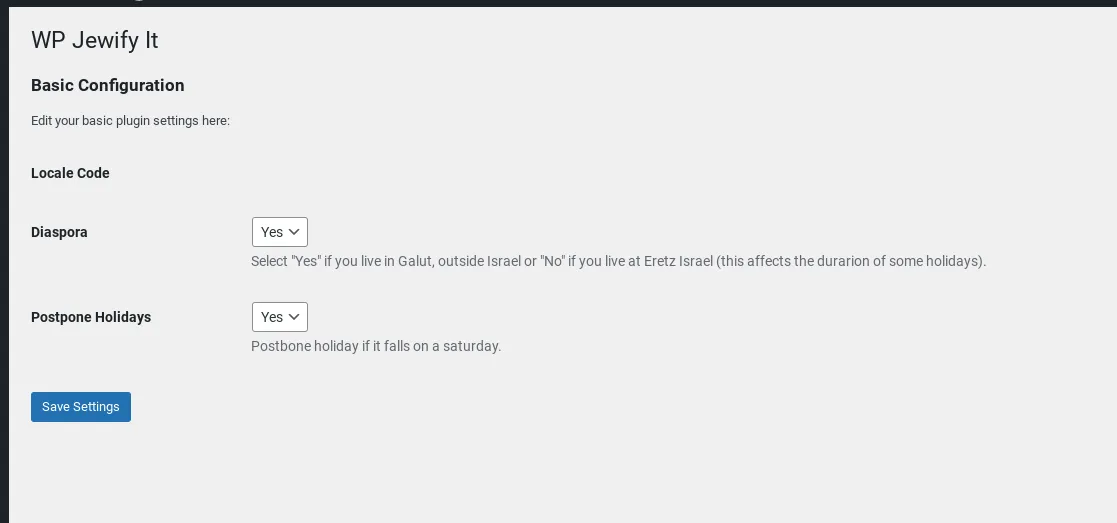
 Gehts auch eine Spur freundlicher?